All verified anomaly tells

Animal Hospital anomalies: window, photo, and CCTV list

Run the same three checks on every arrival: look at the reception window, wait for the photo to finish developing, then make one short CCTV pass. The list below tells you which view exposes each verified anomaly sign and what to do first.

Night shift consolePlayer guide
Animal Hospital Roblox icon
WindowPhotoCCTVRejectRemoveReset
Players online360,172
Total visits603,715,322
Player favorites1,081,492
Server size30
Window

Window anomalies you can reject before check-in

Start at the live reception view. Hollow Eyes, Human Teeth, a Creepy Facial Expression, Three Eyes, Googly Eyes and Sharp Teeth, repeated Twitching, and the Head Banger all break the normal window pattern.

  • Use the red button and shutters for a clear window anomaly.
  • Watch long enough to confirm repeated Twitching rather than one idle movement.
  • Head Banger is the exception: the shutters will not close, so offer coffee or wait for it to leave.
Developed photo

Photo anomalies that need a fully developed image

Some patients look normal at the window. Wait until the image finishes developing, then compare the patient with the photo for an Appearance mismatch, a Static photo, or a Cursed photo with an unnatural result.

  • Do not judge the image while it is still developing.
  • Compare ears, eyes, color, and body shape with the live patient.
  • Reject the patient when the completed photo shows a clear mismatch, static, or unnatural form.
CCTV

CCTV anomalies that pass the first two checks

A normal window and photo do not finish the intake. Use a short camera pass for Deformed Body, Void Body, CCTV Twitching, Skinwalker/Shapeshifter, Different Ears, a Direct camera stare, or Black Eyes.

  • Use the waiting-area view to check the Skinwalker/Shapeshifter mouth.
  • Switch feeds briefly to confirm a body or ear mismatch.
  • Return to reception and reject the patient when the camera sign is clear.
Camera hazard

Exit the camera when the red-eyed hazard takes over the feed

A Black body with red eyes is a camera hazard inside the hospital, not a patient tell to study. Exit the feed immediately, move off the monitor, and repair the affected camera before relying on it again.

  • Do not stay on the feed to confirm a second time.
  • Name the affected camera for teammates.
  • Resume the three-view routine only after the feed is usable again.
Response

Reject first; remove only after an anomaly gets inside

The safest result is stopping an anomaly at reception with the red button and shutters. If one has already completed check-in, keep distance and use the current gun or Taser interaction; completing diagnosis and giving the wrong medicine is a fallback that can reduce shift rewards.

  • Reject before treatment whenever the sign is clear.
  • Do not chase an admitted anomaly without space and an exit.
  • Reset at the familiar hall after the response.
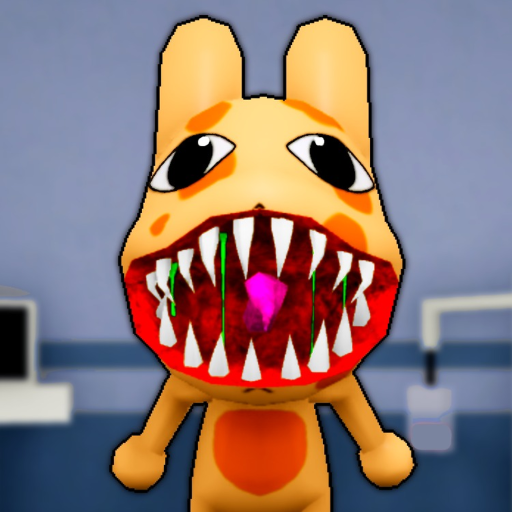
Animal Hospital anomaly list

Where to checkSignFirst action
WindowHollow EyesPress the red button and close the shutters
WindowHuman TeethPress the red button and close the shutters
WindowCreepy Facial ExpressionPress the red button and close the shutters
WindowThree EyesPress the red button and close the shutters
WindowGoogly Eyes and Sharp TeethPress the red button and close the shutters
WindowTwitchingConfirm repeated movement, then close the shutters
WindowHead BangerOffer coffee or wait; the shutters are blocked
Developed photoAppearance mismatchCompare with the live patient, then reject
Developed photoStatic photoWait for processing to finish, then reject
Developed photoCursed photoDo not inspect early; reject after the unnatural image develops
CCTVDeformed BodyConfirm the camera-only body change, then reject
CCTVVoid BodyConfirm the black hollow body, then reject
CCTVCCTV TwitchingConfirm repeated movement on the feed, then reject
CCTVSkinwalker/ShapeshifterCheck the waiting-area mouth, then reject
CCTVDifferent EarsCompare the feed with the live view, then reject
CCTVDirect camera stareLeave the feed and reject the patient
CCTVBlack EyesLeave the feed and reject the patient
Camera hazardBlack body with red eyesExit the feed immediately and repair the camera

Quick answers

How many anomaly types are in Animal Hospital Roblox?

Current guides report 15 or more anomaly types. This list separates the verified patient signs by window, developed photo, CCTV, and the red-eyed camera hazard.

What order should I check an Animal Hospital patient?

Check the reception window, wait for the photo to finish, compare the image, then make one short CCTV pass before accepting the patient.

Why does a normal photo not prove the patient is safe?

Skinwalker/Shapeshifter, Deformed Body, Void Body, Different Ears, Black Eyes, and other camera signs can pass the live window and photo checks.

Why will the shutters not close on Head Banger?

Head Banger blocks the shutters. Offer coffee or wait for it to tire and leave instead of forcing the red button response.

What if an anomaly has already entered the hospital?

Keep distance and use the current gun or Taser interaction. Wrong medicine after diagnosis is a fallback, but it can reduce the shift reward.